
Testimonials
Quotes from customers with a portrait, a name, a role and a star rating, in a grid or a carousel.
munich-demo.myshopify.com
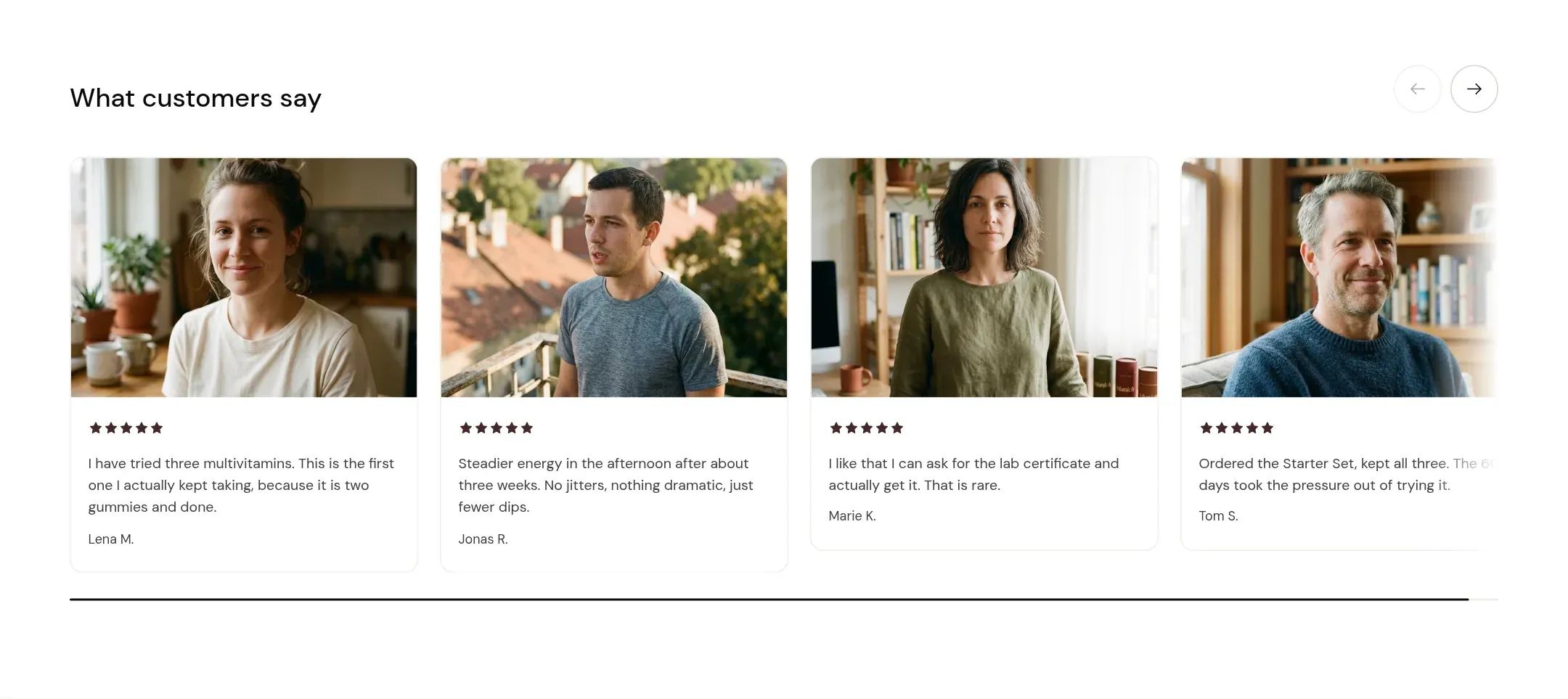
What it does
A section header and a set of cards, each with a portrait, a role line, the quote, a name and a rating. Grid shows two to four per row; Carousel puts them in a scrollable row with arrows. On a phone they stack, or swipe when Swipe on mobile is on.
When to use it
Expert endorsements on the home page (four short quotes from a nutritionist, a doctor, a trainer), customer quotes on the product page after the comparison. One section per page is enough; testimonials work because they are few.
Blocks
- Testimonial: portrait, role, quote, name, rating.
Setting it up
- Add three or four Testimonial blocks. Portrait, quote, name; the role line is where “Verified buyer” or a city goes.
- Set Portrait style and Columns on desktop to the number of blocks.
- Turn on Swipe on mobile.
Settings
| Setting | Type | What it does |
|---|---|---|
| General | ||
| Color scheme | Color scheme | The surface of the section: background, text, buttons and accent as one contrast-checked set. Schemes are edited under Theme settings, Colors. |
| Width | Select | Fixed width keeps the section inside the page margin so it lines up with the sections around it. Full width runs it to the edge of the screen.Options: Fixed width, Full width · Default: Fixed width |
| Layout | Select | Grid lays the cards out in rows. Carousel puts them in one scrollable row with arrows.Options: Grid, Carousel · Default: Grid |
| Swipe on mobile | Checkbox | On a phone, lays the items out in one row that the visitor swipes through, instead of stacking them.Default: off |
| Header | ||
| Heading | Text | The heading of the section. Italicize a word to set it in the accent font.Default: What customers say |
| Size | Select | How large the heading renders, on the shared type scale from Theme settings, Typography.Options: Large, Medium, Small, Extra small · Default: Small |
| Heading level | Select | Page heading is the one heading that names what the whole page is about; use it once per page, usually on the first section. Everything else is a section heading.Options: Page heading, Section heading · Default: Section heading |
| Accent font | Select | Highlight words puts the italicized words on the accent font. Whole heading sets the entire line in it. Off keeps the heading font throughout.Options: Highlight words, Whole heading, Off · Default: Highlight words |
| Text | Rich text | A short paragraph under the heading. Keep it to one or two sentences. |
| Link label | Text | Text of the link at the end of the section header, such as View all. Leave empty for no link. |
| Link | Link | Where the header link leads. |
| Grid | ||
| Columns on desktop | Select | How many cards sit in a row in the grid layout.Options: 2, 3, 4 · Default: 4 |
| Columns on mobile | Select | How many items sit in one row on a phone.Options: 1, 2 · Default: 1 |
| Content | ||
| Portrait style | Select | A photo across the top of the card, a small round avatar next to the name, or no portrait.Options: Image across the top, Round avatar, No portrait · Default: Image across the top |
| Content alignment | Select | Whether the text in the cards sits left or centered.Options: Left, Center · Default: Left |
| Section padding | ||
| Top padding | Range | Space between the top of the section and its content. On a phone the theme tightens it by a quarter.0 to 120 px · Default: 60 |
| Bottom padding | Range | Space between the content and the bottom of the section. On a phone the theme tightens it by a quarter.0 to 120 px · Default: 90 |
Testimonial block
| Setting | Type | What it does |
|---|---|---|
| Portrait | Image | The photo of the person. |
| Role | Text | Who they are: a role, a city, or Verified buyer.Default: Their role or where they are from |
| Quote | Rich text | What the person said, in their words.Default: <p>Say what this person actually said about the product.</p> |
| Name | Text | The person's name, or first name and initial.Default: Name the person quoted |
| Rating | Range | The stars this person gave, 1 to 5. 0 shows no stars.0 to 5 · Default: 0 |
This section also accepts app blocks, so apps that provide one can add content here.
Tips
- Use real quotes from real customers, with their permission, and leave the rating at 0 when the person did not give one. The theme shows no stars for 0.
- Portrait style Image across the top wants a photo per card at the same ratio. Round avatar works with mixed photos. No portrait is for quotes without faces.
- On a phone, four cards stack to a long column. Turn on Swipe on mobile so visitors flick through them instead.
- Testimonials are not reviews. For a review app's ratings and review list, use its app block in the Product information section.