
Sticky buy bar
A slim bar with product, price and add to cart that appears once the buy box has scrolled away.
munich-demo.myshopify.com
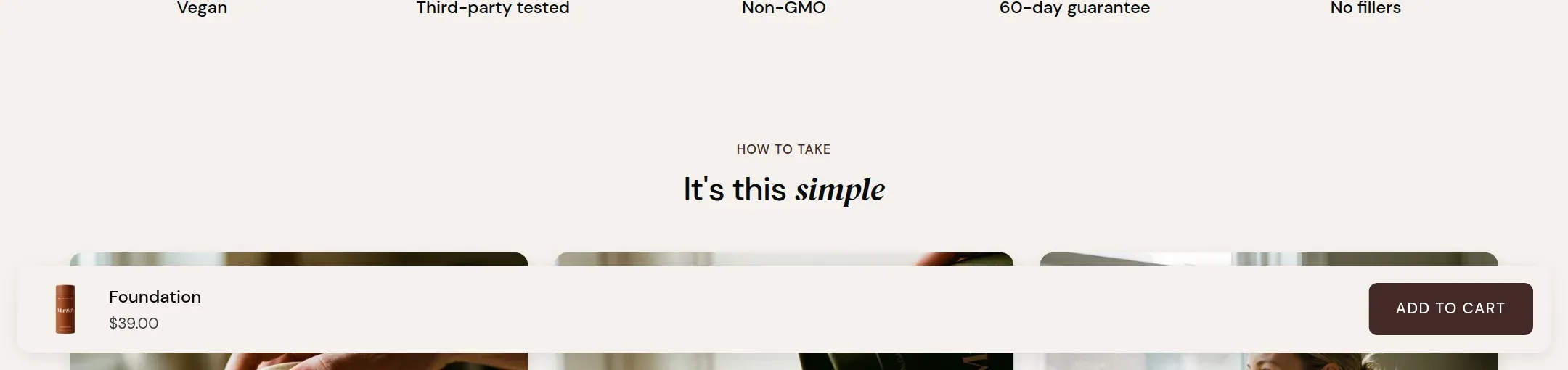
What it does
A bar fixed to the bottom of the screen with the product image, the name, the price of the selected variant and an add to cart button. It appears when the buy box of the Product information section has scrolled out of view above and disappears when the buy box is back. It follows the variant chosen in the buy box and, in the With variant layout, lets the visitor change it from the bar.
When to use it
On every product page with a story below the buy box, which in Munich is every product page. On a phone it is the difference between reading and buying.
Setting it up
- Add the section to the product template. Position in the list does not matter; the bar is fixed to the screen.
- Choose Layout and Style.
Settings
| Setting | Type | What it does |
|---|---|---|
| General | ||
| Color scheme | Color scheme | The surface of the section: background, text, buttons and accent as one contrast-checked set. Schemes are edited under Theme settings, Colors. |
| Layout | Select | Compact shows image, name, price and the button. With variant adds a variant select. With quantity adds the quantity field as well.Options: Compact, With variant, With quantity · Default: Compact |
| Style | Select | Floating card lifts the bar off the screen edges with a margin. Full width runs it edge to edge.Options: Floating card, Full width · Default: Floating card |
Tips
- The bar appears only after the buy box has left the screen upwards, and hides again when the visitor scrolls back to it. At the top of the page nothing is shown.
- With variant adds a small variant select to the bar, so a visitor who has read the whole page can choose the pack without scrolling up. With quantity adds the quantity field as well.
- The bar is a section on the product template. Remove it from the template to turn it off.