
Social gallery
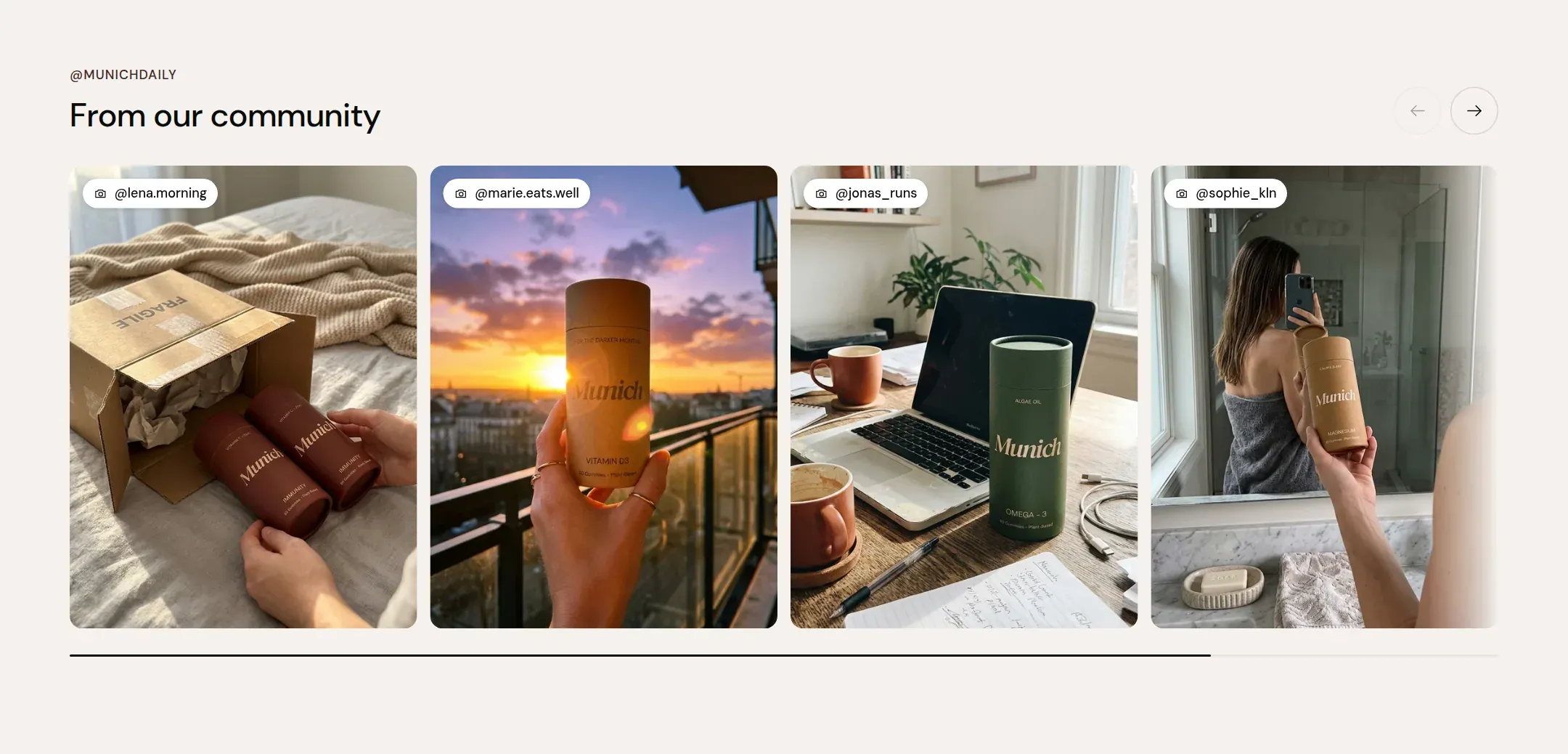
Customer photos and clips as tiles with the account handle on each, in a carousel or a grid.
munich-demo.myshopify.com
What it does
A section header and a set of tiles, each with an image or a short clip, the handle of the account it came from and a link. Carousel shows them in a scrollable row with arrows; Grid lays them out in two to five columns. The header link is the place for your own profile.
When to use it
Near the bottom of the home page, after the story and before the footer, as the proof that people use the product in their lives. Also on the about page.
Blocks
- Post: image or video, handle, link.
Setting it up
- Add six to eight Post blocks with image or clip, Handle and Link.
- Set Image ratio and Columns on desktop.
- Set the header Link label to “Follow us” and the Link to your profile.
Settings
| Setting | Type | What it does |
|---|---|---|
| General | ||
| Color scheme | Color scheme | The surface of the section: background, text, buttons and accent as one contrast-checked set. Schemes are edited under Theme settings, Colors. |
| Width | Select | Fixed width keeps the section inside the page margin so it lines up with the sections around it. Full width runs it to the edge of the screen.Options: Fixed width, Full width · Default: Fixed width |
| Layout | Select | Carousel shows the posts in one scrollable row with arrows. Grid lays them out in columns.Options: Carousel, Grid · Default: Carousel |
| Header | ||
| Label | Text | A small kicker above the heading, such as Community. |
| Heading | Text | The heading of the section. Italicize a word to set it in the accent font.Default: From our community |
| Size | Select | How large the heading renders, on the shared type scale from Theme settings, Typography.Options: Large, Medium, Small, Extra small · Default: Medium |
| Heading level | Select | Page heading is the one heading that names what the whole page is about; use it once per page, usually on the first section. Everything else is a section heading.Options: Page heading, Section heading · Default: Section heading |
| Accent font | Select | Highlight words puts the italicized words on the accent font. Whole heading sets the entire line in it. Off keeps the heading font throughout.Options: Highlight words, Whole heading, Off · Default: Highlight words |
| Text | Rich text | A short paragraph under the heading. Keep it to one or two sentences. |
| Content alignment | Select | Whether heading, text and buttons sit left, centered or right inside the section.Options: Left, Center · Default: Left |
| Link label | Text | Text of the link at the end of the section header, such as View all. Leave empty for no link. |
| Link | Link | Where the header link leads. |
| Grid | ||
| Columns on desktop | Select | How many items sit in one row on a desktop screen.Options: 2, 3, 4, 5 · Default: 4 |
| Columns on mobile | Select | How many items sit in one row on a phone.Options: 1, 2 · Default: 1 |
| Image ratio | Select | The shape every tile is cropped to.Options: Square, Portrait, Landscape · Default: Square |
| Gap | Select | The space between items in the grid.Options: Small, Medium, Large · Default: Medium |
| Section padding | ||
| Top padding | Range | Space between the top of the section and its content. On a phone the theme tightens it by a quarter.0 to 120 px · Default: 60 |
| Bottom padding | Range | Space between the content and the bottom of the section. On a phone the theme tightens it by a quarter.0 to 120 px · Default: 90 |
Post block
| Setting | Type | What it does |
|---|---|---|
| Image | Image | The photo of the post. |
| Video | Video | A short clip that plays muted and looping instead of the photo. |
| Handle | Text | The account the post came from, with the @. Shown on the tile as credit. |
| Link | Link | Where the tile leads, usually the original post. |
This section also accepts app blocks, so apps that provide one can add content here.
Tips
- Ask before you use a customer's photo, and write the handle they use. The handle on the tile is both credit and permission made visible.
- Square is the ratio most social photos come in. Portrait suits clips shot on a phone.
- A short clip plays muted and on a loop in the tile. Keep clips under ten seconds and under a few megabytes; the section loads them lazily, but a visitor still has to download them.
- The section does not connect to an Instagram account. You add the posts yourself, which means it keeps working when the platform changes its rules.