
Comparison
Your product against one to three alternatives, feature by feature, with yes, no or a short text per cell.
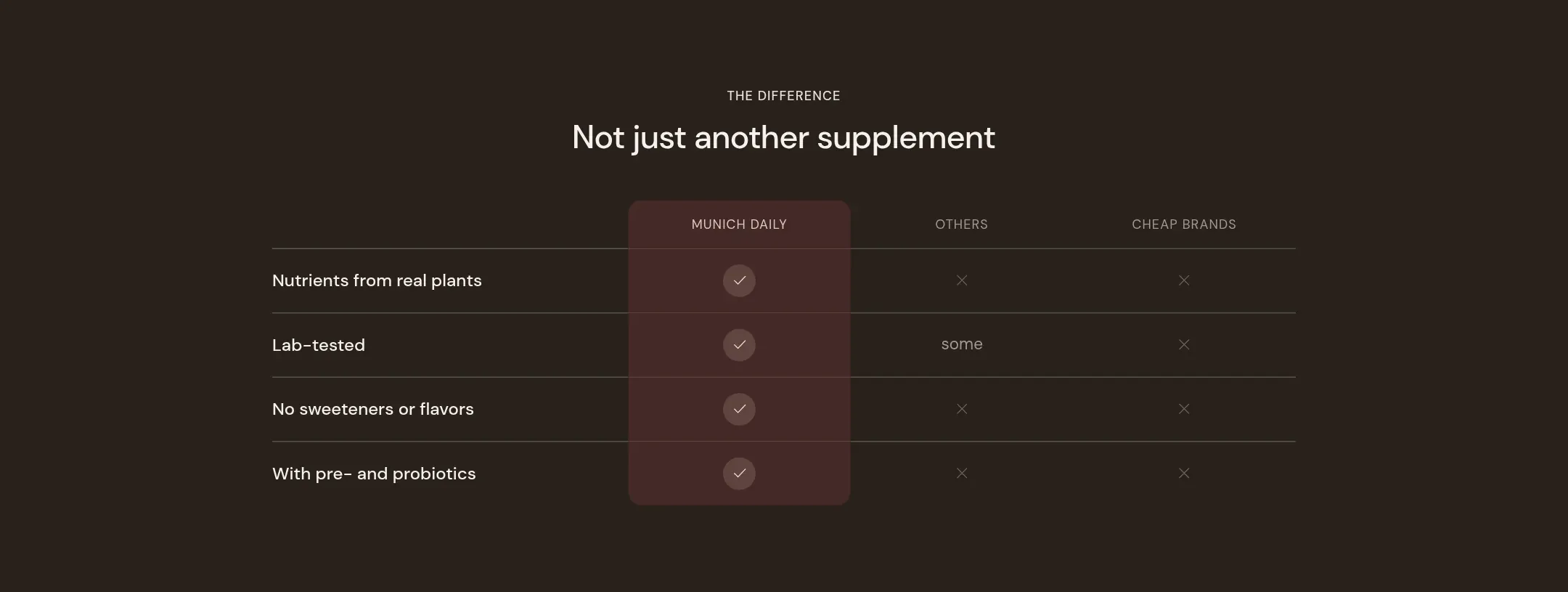
What it does
A table with your product in the first value column and one to three alternatives beside it. Every row is a feature; every cell is a check, a cross or a short text. The header row can show logos. Minimal rows draws quiet lines, Highlighted brand column lifts your column on a color scheme of its own, Cards puts each row on a card. On a phone the table becomes a stack of cards.
When to use it
On the product page after the story and before the testimonials, where a visitor who is still comparing needs the answer in one glance. On the home page only if comparison is the core of your pitch.
Blocks
- Comparison row: the feature name and a value per column: Yes, No or Custom text with the text to show.
Setting it up
- Set Competitor columns to 1, 2 or 3 and name them under Competitor 1 to 3. Upload logos if you have rights to them, otherwise leave the labels as text.
- Set Brand name or leave it empty to show the shop name, and pick a Brand column color scheme.
- Add a Comparison row per feature and set the values.
- Choose Layout and Title position.
Settings
| Setting | Type | What it does |
|---|---|---|
| General | ||
| Color scheme | Color scheme | The surface of the section: background, text, buttons and accent as one contrast-checked set. Schemes are edited under Theme settings, Colors. |
| Width | Select | Fixed width keeps the section inside the page margin so it lines up with the sections around it. Full width runs it to the edge of the screen.Options: Fixed width, Full width · Default: Fixed width |
| Layout | Select | Minimal rows draws quiet lines. Highlighted brand column lifts your column onto its own color scheme. Cards puts each row on a card.Options: Minimal rows, Highlighted brand column, Cards · Default: Minimal rows |
| Title position | Select | Whether the heading sits above the table or in a column beside it.Options: Above the table, Beside the table · Default: Above the table |
| Header | ||
| Label | Text | A small kicker above the heading, such as The difference. |
| Heading | Text | The heading of the section. Italicize a word to set it in the accent font.Default: Why we are the better choice |
| Size | Select | How large the heading renders, on the shared type scale from Theme settings, Typography.Options: Large, Medium, Small, Extra small · Default: Medium |
| Heading level | Select | Page heading is the one heading that names what the whole page is about; use it once per page, usually on the first section. Everything else is a section heading.Options: Page heading, Section heading · Default: Section heading |
| Accent font | Select | Highlight words puts the italicized words on the accent font. Whole heading sets the entire line in it. Off keeps the heading font throughout.Options: Highlight words, Whole heading, Off · Default: Highlight words |
| Text | Rich text | A short paragraph under the heading. Keep it to one or two sentences. |
| Content alignment | Select | Whether heading, text and buttons sit left, centered or right inside the section.Options: Inherit, Left, Center · Default: Inherit |
| Your column | ||
| Brand name | Text | The name above your column. Empty shows the shop name. |
| Brand logo | Image | Your logo above your column, instead of the name. |
| Brand column color scheme | Color scheme | The scheme of your column in the Highlighted brand column layout. |
| Competitor columns | ||
| Competitor columns | Select | How many alternative columns the table has.Options: 1, 2, 3 · Default: 2 |
| Competitor 1 | Text | The name above the first alternative column, such as Others.Default: Others |
| Competitor 1 logo | Image | A logo above the first alternative column, instead of the name. |
| Competitor 2 | Text | The name above the second alternative column.Default: Cheap brands |
| Competitor 2 logo | Image | A logo above the second alternative column. |
| Competitor 3 | Text | The name above the third alternative column. |
| Competitor 3 logo | Image | A logo above the third alternative column. |
| Section padding | ||
| Top padding | Range | Space between the top of the section and its content. On a phone the theme tightens it by a quarter.0 to 120 px · Default: 60 |
| Bottom padding | Range | Space between the content and the bottom of the section. On a phone the theme tightens it by a quarter.0 to 120 px · Default: 60 |
Comparison row block
| Setting | Type | What it does |
|---|---|---|
| Feature | Text | A small kicker above the heading, such as The difference. |
| Your brand | ||
| Value | Select | What your column shows in this row: a check, a cross, or the custom text.Options: Yes, No, Custom text · Default: Yes |
| Custom text | Text | The text shown in your cell when the value is Custom text. |
| Competitor 1 | ||
| Value | Select | What the first alternative shows in this row.Options: Yes, No, Custom text · Default: No |
| Custom text | Text | The text in the first alternative cell when its value is Custom text. |
| Competitor 2 | ||
| Value | Select | What the second alternative shows in this row.Options: Yes, No, Custom text · Default: No |
| Custom text | Text | The text in the second alternative cell when its value is Custom text. |
| Competitor 3 | ||
| Value | Select | What the third alternative shows in this row.Options: Yes, No, Custom text · Default: No |
| Custom text | Text | The text in the third alternative cell when its value is Custom text. |
This section also accepts app blocks, so apps that provide one can add content here.
Tips
- Keep competitor columns generic: Others, Cheap brands, Pills. Naming a competitor invites a dispute and rarely convinces.
- Four to six rows. Pick the features where you win clearly; a table with a No in your own column is more credible, but only if it is a feature that does not matter.
- On a phone the table turns into one card per row with the three values under each other. Long custom text gets cramped there; keep cells to one or two words.
- Highlighted brand column puts your column on its own color scheme so it reads as the answer. It is the layout the demo uses.