
Product grid
The collection page's grid with quick filter pills, filters and sorting, pagination and an optional promo tile.
munich-demo.myshopify.com
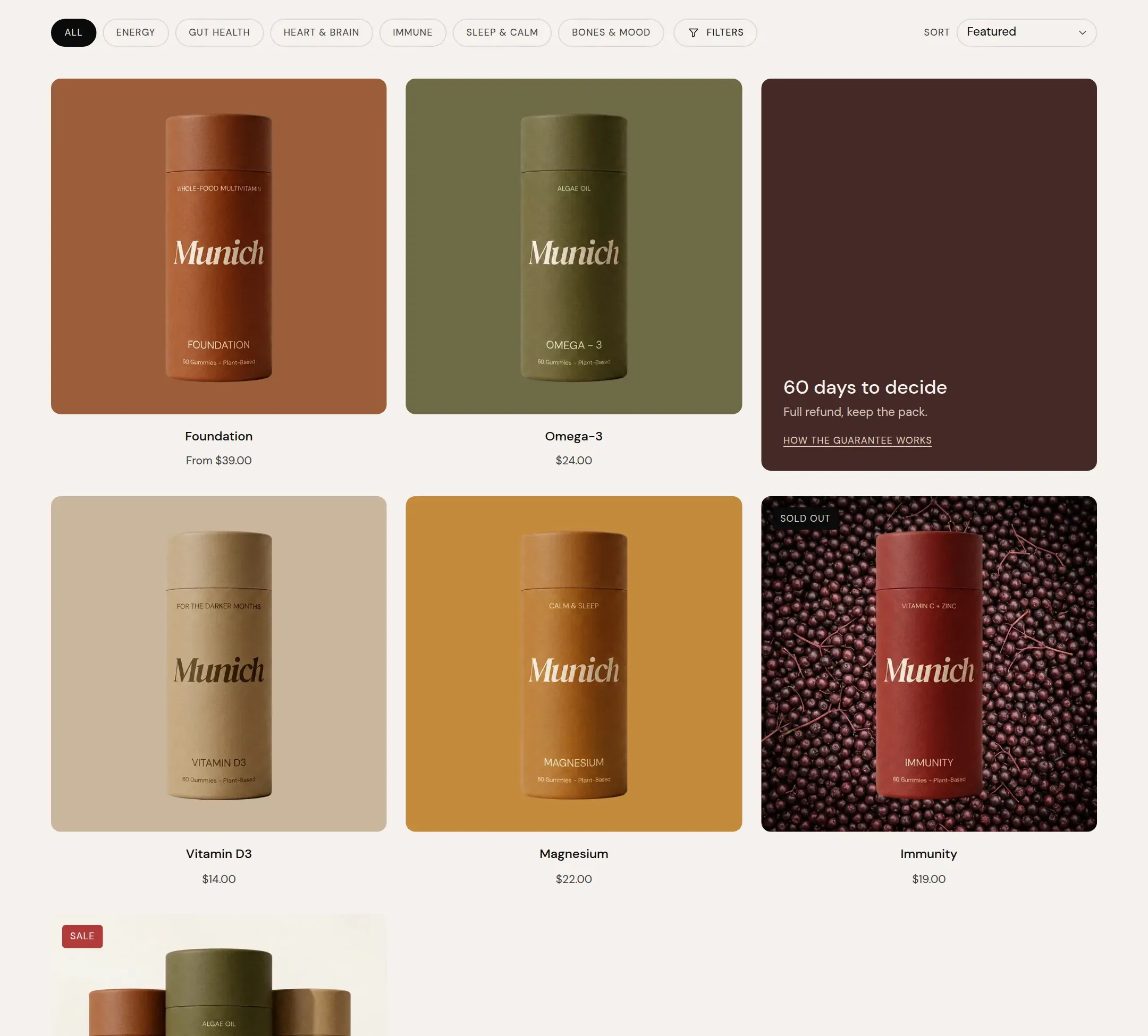
What it does
The main section of a collection page. Product cards in two to four columns with pagination, a toolbar with quick filter pills, a Filters button that opens the full filter set and a sort select, and an optional promo tile placed among the products. Filtering and sorting update the grid in place; without JavaScript they still work as normal page loads.
When to use it
It is on the collection template already, between the Collection banner and the Collection text. Cards follow the Product cards settings; this section decides how many, in how many columns, and what sits around them.
Setting it up
- Set Columns on desktop (3 for a range of six to nine, 4 for more) and Products per page.
- In the Search & Discovery app, set up your filters. Turn on Enable filtering and Enable sorting here.
- For pills, type the filter parameter into Quick-filter parameter.
- For a promo tile, turn on Show a promo tile, write heading, text and link, choose a background and set Position in the grid and Columns wide.
Settings
| Setting | Type | What it does |
|---|---|---|
| General | ||
| Color scheme | Color scheme | The surface of the section: background, text, buttons and accent as one contrast-checked set. Schemes are edited under Theme settings, Colors. |
| Width | Select | Fixed width keeps the section inside the page margin so it lines up with the sections around it. Full width runs it to the edge of the screen.Options: Fixed width, Full width · Default: Fixed width |
| Filtering and sorting | ||
| Enable filtering | Checkbox | Shows the Filters button and the quick filter pills. Filters are set up in the Search & Discovery app.Default: on |
| Quick-filter parameter | Text | Which filter to show as pills above the grid, by its URL parameter, such as filter.p.product_type. Empty uses the first list filter. |
| Enable sorting | Checkbox | Shows the sort select.Default: on |
| Grid | ||
| Products per page | Range | How many products a page shows before pagination.8 to 48 · Default: 12 |
| Columns on desktop | Select | How many items sit in one row on a desktop screen.Options: 2, 3, 4 · Default: 3 |
| Columns on mobile | Select | How many items sit in one row on a phone.Options: 1, 2 · Default: 2 |
| Promo tile | ||
| Show a promo tile | Checkbox | Places a tile among the products, on the first page of the unfiltered collection.Default: off |
| Background | Select | A plain color surface in the tile's scheme, or an image.Options: Color, Image · Default: Color |
| Image | Image | The image of the tile when Background is Image. |
| Color scheme | Color scheme | The surface of the tile, separate from the page. |
| Heading | Text | The title on the tile.Default: Name what this tile promotes |
| Text | Text | One line under the title. |
| Link label | Text | The link text on the tile. |
| Link | Link | Where the tile leads. |
| Position in the grid | Range | The place in the grid the tile takes; the product at that place moves one on. Past the end puts it after the last product.1 to 12 · Default: 3 |
| Columns wide | Select | Whether the tile is as wide as one product card or two.Options: 1, 2 · Default: 1 |
| Section padding | ||
| Top padding | Range | Space between the top of the section and its content. On a phone the theme tightens it by a quarter.0 to 120 px · Default: 40 |
| Bottom padding | Range | Space between the content and the bottom of the section. On a phone the theme tightens it by a quarter.0 to 120 px · Default: 60 |
Tips
- This section belongs to the collection template. Filters come from the Shopify Search & Discovery app, under Filters; the theme shows whatever is set there.
- The quick filter pills show one filter's values as a row of pills above the grid. Set Quick-filter parameter to the filter you want there, for example filter.p.product_type, or leave it empty for the first list filter.
- On a phone the pills scroll sideways in one row and the rest of the filters open in a drawer.
- The promo tile appears on the first page of the unfiltered collection only, so it never looks like a search result.