
Collage
A grid of image or color tiles with text over or under them, each tile its own width and height.
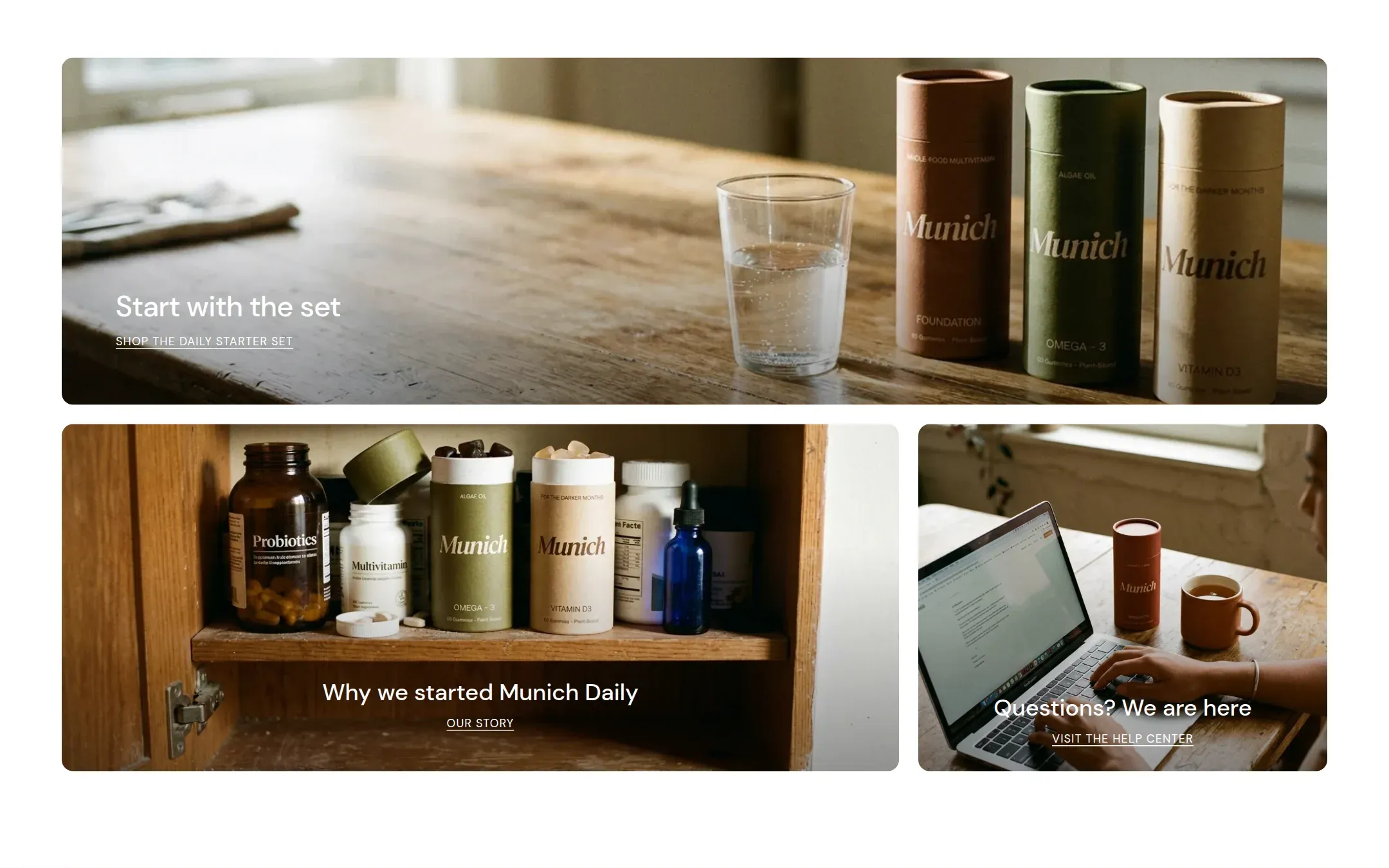
What it does
A section header and a set of tiles. Every tile is an image (with an optional mobile crop) or a plain color surface in a scheme of its choice, with a heading and a link. The text sits over the image at one of nine positions with an adjustable dark overlay, or below it. Each tile chooses its width in the grid (full, two thirds, half, one third) and one of three heights.
When to use it
Signposts: the three places a visitor can go next from the home page, a set of categories, an editorial row of three photos with captions. Also as the one image banner between two text sections. Not for products; the Featured collection has the cards.
Blocks
- Collage tile: background type, color scheme, image and mobile image, width, height, text position and alignment, overlay, heading, link label and link.
Setting it up
- Decide on the row shapes first: a full tile above two halves, or three thirds.
- Add the Collage tile blocks with the matching Width, upload images, set Height.
- Write a Heading and Link label per tile, set the Link.
- Adjust Overlay opacity per tile until the text is readable.
Settings
| Setting | Type | What it does |
|---|---|---|
| General | ||
| Color scheme | Color scheme | The scheme of the tile: the surface of a color tile, and the text and overlay colors of an image tile. |
| Width | Select | Fixed width keeps the section inside the page margin so it lines up with the sections around it. Full width runs it to the edge of the screen.Options: Fixed width, Full width · Default: Fixed width |
| Header | ||
| Heading | Text | The title on the tile.Default: A closer look |
| Size | Select | How large the heading renders, on the shared type scale from Theme settings, Typography.Options: Large, Medium, Small, Extra small · Default: Small |
| Heading level | Select | Page heading is the one heading that names what the whole page is about; use it once per page, usually on the first section. Everything else is a section heading.Options: Page heading, Section heading · Default: Section heading |
| Accent font | Select | Highlight words puts the italicized words on the accent font. Whole heading sets the entire line in it. Off keeps the heading font throughout.Options: Highlight words, Whole heading, Off · Default: Highlight words |
| Text | Rich text | A short paragraph under the heading. Keep it to one or two sentences. |
| Content alignment | Select | Whether heading, text and buttons sit left, centered or right inside the section.Options: Left, Center · Default: Left |
| Link label | Text | The link text under the title, such as Read more. |
| Link | Link | Where the tile leads. The whole tile is clickable. |
| Grid | ||
| Gap | Select | The space between tiles.Options: Small, Medium, Large · Default: Medium |
| Section padding | ||
| Top padding | Range | Space between the top of the section and its content. On a phone the theme tightens it by a quarter.0 to 120 px · Default: 60 |
| Bottom padding | Range | Space between the content and the bottom of the section. On a phone the theme tightens it by a quarter.0 to 120 px · Default: 100 |
Collage tile block
| Setting | Type | What it does |
|---|---|---|
| Background | Select | Image shows a photo on the tile. Color shows a plain surface in the tile's color scheme.Options: Image, Color · Default: Image |
| Color scheme | Color scheme | The scheme of the tile: the surface of a color tile, and the text and overlay colors of an image tile. |
| Image | Image | The tile photo. For a full width tile 2400 px wide, for a half tile 1200 px. |
| Mobile image | Image | A crop for phones, where the tile is narrower and taller. Falls back to the main image. |
| Width | Select | How much of the row the tile takes. Tiles that do not fit a row wrap onto the next.Options: Full width, Two thirds, Half, One third · Default: Half |
| Height | Select | How tall the tile is, relative to the other tiles.Options: Short, Medium, Tall · Default: Medium |
| Text | ||
| Text position | Select | Whether heading and link sit on the image or in a text area below it.Options: Over the image, Below the image · Default: Over the image |
| Vertical position | Select | Where the text sits on the image: top, middle or bottom.Options: Top, Middle, Bottom · Default: Bottom |
| Text alignment | Select | Whether the text on the tile sits left, centered or right.Options: Left, Center, Right · Default: Center |
| Text spacing | Select | How far the text keeps from the edge of the tile. Automatic gives wide tiles more room.Options: Automatic, Small, Medium, Large · Default: Automatic |
| Overlay opacity | Range | How much the image is darkened behind the text so it stays readable.0 to 80 % · Default: 40 |
| Heading | Text | The title on the tile.Default: Name what this tile leads to |
| Size | Select | How large the tile heading renders.Options: Large, Medium, Small, Extra small · Default: Small |
| Link label | Text | The link text under the title, such as Read more.Default: Read more |
| Link | Link | Where the tile leads. The whole tile is clickable. |
This section also accepts app blocks, so apps that provide one can add content here.
Tips
- Widths add up per row: two halves, or a third and two thirds, or one full width. The theme wraps what does not fit onto the next row.
- Upload a Mobile image for wide tiles. A full width landscape tile becomes a small strip on a phone without one.
- A color tile with a heading and a link is a good way to break a row of photos; give it a scheme that contrasts with the section.
- A single full width tile with the text over it is Munich's image banner. There is no separate banner section.